Scheduling

Scheduling software built for mowing rounds, not one-off bookings.

Most job software treats every job as a one-off. Lawn and garden work is the opposite: the same properties, week after fortnight, all year. SortScape is built around repeating visits, so your schedule stays right with almost no admin.

Free trial. No contracts. Cancel anytime.

Everything a maintenance schedule needs.

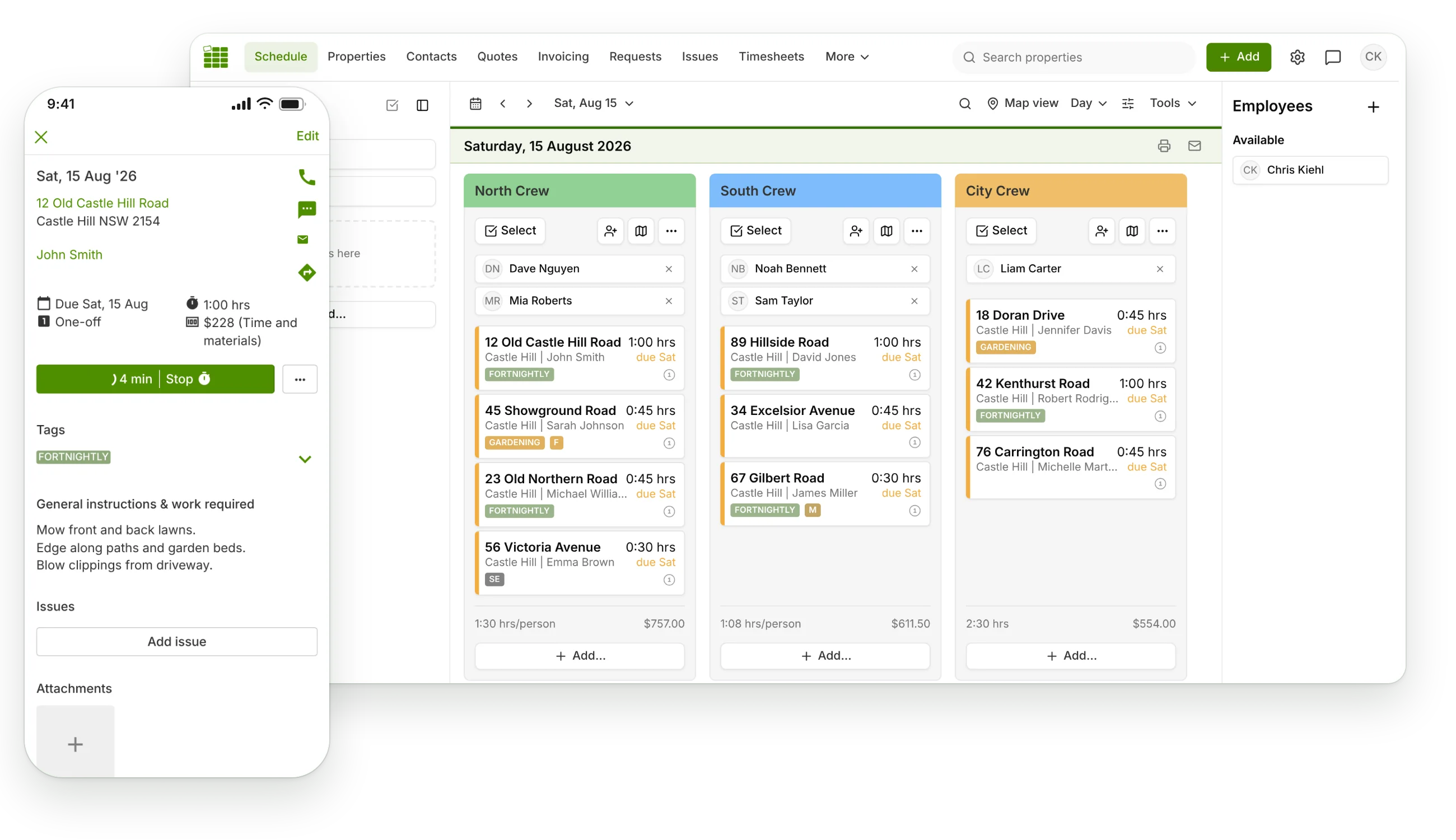
Set up a customer once and SortScape keeps their visits coming around at the right frequency, on the right day, with the right crew.

Repeating visits done properly

Set a visit to repeat weekly, fortnightly, or on any custom interval. SortScape generates the whole series so your regular mowing rounds are always on the calendar.

Seasonal schedules

Visit fortnightly in summer and monthly in winter without touching every job. Set the frequency per season once and SortScape adjusts the series for you.

Drag-and-drop rescheduling

Rain day? Drag the visit to another day. If it is part of a repeating series, one click applies the change to all future visits, or you can move just that one.

Job runs for each crew

Group the day's visits into runs, assign them to crews, and copy a whole run to another day when you need to. Everyone knows where they are meant to be.

Automatic visit reminders

On Premium, SortScape sends SMS or email notifications before each visit using your templates, so customers know you are coming without you texting all night.

Works offline in the field

The app stores the next two days of your schedule on the phone. Crews can see their visits, notes, and property details even with no reception.

Rain days happen

Reschedule a washed-out day in minutes, not hours.

Weather runs this industry. When a storm wipes out Tuesday, drag the visits to later in the week. SortScape asks whether the change should apply to future visits in each series, so a one-off move stays one-off and a permanent change sticks.

  • Drag and drop visits between days and runs
  • Move one visit or the whole repeating series
  • Bulk-select visits when a whole day needs to shift
  • Let customers know with SMS or email in a couple of taps

More scheduling tools included:

  • Day, week, and month views of your whole schedule
  • Visit checklists so nothing on the job gets missed
  • Tags to mark quotes, first visits, or anything you like
  • Notes and photos attached to every visit and property
  • Visit confirmations to flag jobs that need a customer OK
  • Printable run sheets for crews who prefer paper
  • One-way sync to Google Calendar, Apple Calendar, and Outlook
  • Bulk-select visits to move or update many at once

Scheduling is where SortScape starts, not where it ends.

Each visit connects to the rest of your workday. Order the run with route optimisation, track hours with the visit timer, then turn completed visits into invoices with built-in invoicing or Xero and QuickBooks sync. Quoting a new job first? Start with quoting or price it with the free lawn mowing calculator.

Scheduling FAQs

Can I schedule visits that repeat weekly or fortnightly? +
Yes. Repeating visits are the core of SortScape. Choose a common option like repeats every 2 weeks, or set a custom interval, frequency, and end date. There is no limit on the number of visits, properties, or contacts on any plan.
What happens to future visits when I move one? +
You choose. Drag a repeating visit to a new day and it moves just that visit by default. If you want the whole series to follow, click the Apply to future jobs in this series button and every future visit moves too.
Can I visit customers more often in summer than in winter? +
Yes. Seasonal schedules let you set a different repeat frequency for each season, for example every 2 weeks in summer and every 6 weeks in winter. SortScape applies the right frequency automatically as seasons change.
Can my crew see the schedule on their phones? +
Yes. SortScape has iOS and Android apps, and every user can be logged in on several devices at once. Crews see their assigned runs, visit notes, photos, and property history in the field.
Does the schedule work without mobile reception? +
Yes. The app automatically stores the next two days of your schedule on the phone. If you lose reception, it switches to the offline schedule so crews can keep working.
Can customers get a reminder before we arrive? +
Yes. On the Premium plan, SortScape sends automatic SMS or email reminders before each visit using message templates you control. You can also send one-off notifications manually from any visit on any plan.
How is SortScape different from a generic calendar app? +
A calendar shows appointments. SortScape connects each visit to the property, the customer's history, photos, checklists, time tracking, and invoicing. When a visit is done you can invoice it, and route optimisation orders the day's visits to cut drive time.

Spend Sunday night with your family, not your schedule.

Set up your rounds once and let SortScape keep them turning over. Start a free trial and see your first week scheduled in minutes.
SortScape app