

Seasonal schedules
Last updated:
The lawn and garden maintenance business is highly seasonal. Having the same job frequency throughout the entire year doesn’t always work because you typically job customers more frequently in the warmer months and less frequently in the cooler months. To allow for different repeating frequencies throughout the year, SortScape has the concept of “seasonal schedules”.
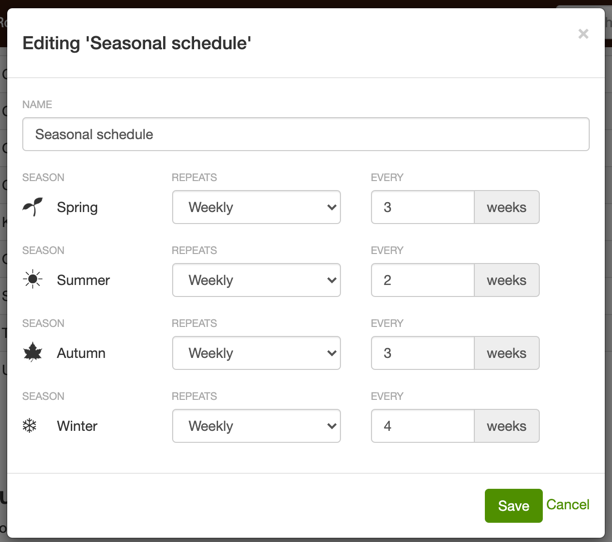
Within a seasonal schedule, you can specify the repeat frequency for each season within the year. For example, you might visit seasonal customers once every 3 weeks during the spring and once every two weeks in the summer as shown below. That can be specified in a seasonal schedule.
Specifying a seasonal schedule on a job
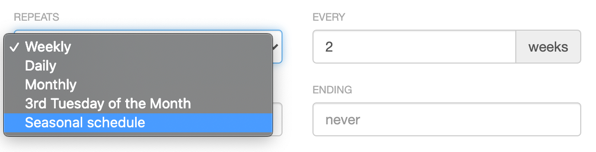
Section titled “Specifying a seasonal schedule on a job”When adding or editing a repeating job, you can specify a seasonal schedule in the “repeats” dropdown. When you save the job, SortScape will then apply the correct repeat frequency to the job based on:
- The season currently specified for your SortScape site and
- The repeat frequency that the seasonal schedule specifies for the current season. When you change the season for your SortScape site, it will then change the repeat frequency for that SortScape job to be the frequency specified for that season.
You can specify a seasonal schedule in the “repeats” dropdown as shown below:
EXAMPLE
If the seasonal schedule selected specifies that the repeat frequency should be every 2 weeks during the summer and the season for your SortScape site is currently set to "summer", then the job you create will repeat every 2 weeks.
When you change the season for your SortScape site to "Autumn" then the repeat frequency for that job will change from every 2 weeks to whatever repeat frequency is specified for Autumn in the seasonal schedule.
Adding and editing seasonal schedules
Section titled “Adding and editing seasonal schedules”To add or edit a seasonal schedule, open Settings → Jobs → Seasonal schedules.
Your SortScape site comes with a default seasonal schedule which you can edit. If all of your seasonal customers follow the same seasonal schedule (e.g. you might visit all of them once every 2 weeks in the summer and once every 4 weeks in the winter) then you should only need one seasonal schedule. If your customers have different seasonal schedules (e.g. some are every 2 weeks in the summer / 4 weeks in the winter and others are every 3 weeks in the summer / 5 weeks in the winter) then you will need 2 seasonal schedules.
You can specify the repeat frequency for each season as shown below:
Changing the season
Section titled “Changing the season”In SortScape, seasons don’t change automatically; you have the control to switch seasons as needed. This flexibility allows you to adapt to early or late starts of the growing season. When you update the season on your SortScape site, it automatically adjusts the repeat frequency for all scheduled jobs based on the new season’s settings. For example, if jobs are set to occur “every 2 weeks” in Summer but “every 3 weeks” in Autumn, switching from Summer to Autumn will change all applicable jobs to the 3-week interval.
Important: Ensure all previous jobs are marked complete or skipped before changing seasons. To check which clients are on a seasonal schedule first, see How do I see a list of my regular customers?. The update will not change the date for the next scheduled job but rather the date for any jobs after that.
To Change the Season:
- Open Settings → Jobs → Seasonal schedules.
- Select the desired season from the dropdown menu You can change the season at any point to suit your scheduling needs.