

How to handle quotes
Last updated:
Getting quotes right is just as crucial as the actual gardening and lawn care work. Below we’ve outlined an effective quoting process to ensure you can continue to provide accurate quotes to your clients seamlessly.
Setting up an assessment job
Section titled “Setting up an assessment job”Many businesses like to perform an in-person job before providing a customer quote. In this case, your first step is to schedule a one-off assessment job in SortScape. This is where you’ll gather all the necessary information to prepare an accurate quote.
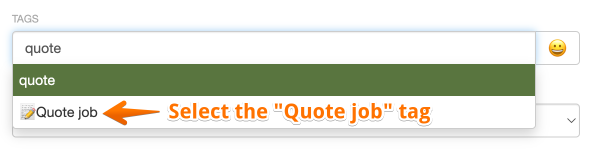
A quote job is a normal one-off job with two differences: it has the 📝 tag (described as Quote job), and it isn’t invoiced. New accounts start with the 📝 tag. If you don’t have it, create it under Settings → Jobs → Tags.
To book a quote job straight from the schedule:
- Open Schedule and click Add… on the run, then choose Job.
- Pick the property, a date and who’s going.
- Add the 📝 tag.
- Turn off Requires invoicing, so the job doesn’t show up as work to invoice.
- Click Create.
The 📝 shows on the job card on the schedule, so your crew can tell quote jobs from paid work at a glance. If the customer sent you a request, click Schedule quote [job type] on the request instead. It adds the tag and turns off invoicing for you, fills in the work required from the request and links the request to the job.
On-site assessment
Section titled “On-site assessment”When you’re on-site, it’s your opportunity to thoroughly understand the job’s requirements. Take detailed notes and don’t forget to use SortScape’s feature to attach photos of the site. These images can be incredibly helpful later when you’re finalizing the quote.
If you have line item photos enabled, you can also attach specific photos to individual quote line items so the customer sees exactly what each item covers.
Creating and sending the quote
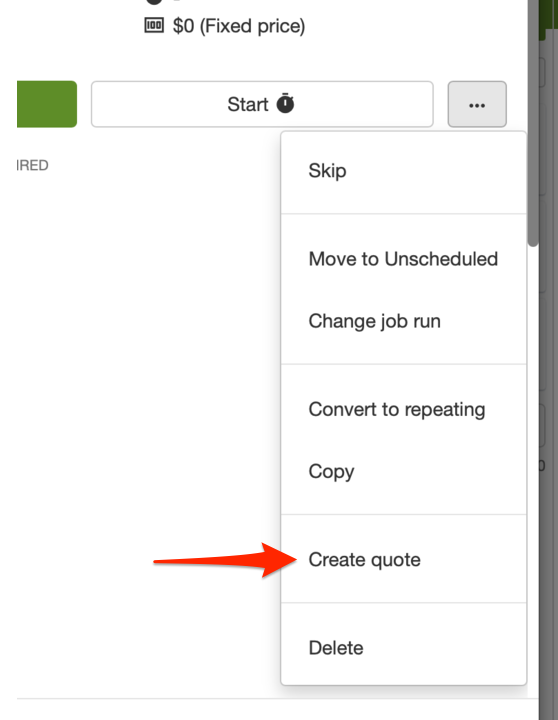
Section titled “Creating and sending the quote”Once you’ve got all the information you need, it’s time to put together the quote. You can create a quote directly from a one-off job as shown below:
Scheduling approved work
Section titled “Scheduling approved work”After your quote is approved, the next step is to schedule the work in SortScape. This is described in more detail in this article. Depending on the job, you might set up a one-off job or recurring jobs. This ensures that the job is officially on your schedule and you’re ready to go.
Using SortScape’s job-scheduling and quoting features ensures you stay organized and efficient, setting a clear path from assessment to job completion.
Key takeaways:
Section titled “Key takeaways:”- Schedule a 📝 tagged, non-invoiced job for assessments.
- Utilize SortScape’s photo attachment feature for a visual record.
- Create the quote.
- Schedule the approved work back in SortScape. By following these steps, you can maintain a streamlined process for managing quotes, ensuring nothing falls through the cracks as you provide top-notch service to your clients.