

What do the color codes on the schedule mean?
Last updated:
Jobs on the schedule will appear in different colours depending on the due date of the job. So if you reschedule a job by dragging it to a different date on the schedule, SortScape will still track the job’s original due date so you know when that job was meant to happen.
If the due date of the job is next week or later, the job will be gray.
If the job is due today or this week, the job will be orange.
If the job is overdue (i.e. due before today) the job will be red.
If the job has been marked complete, the job will be green. A special case here are non-billable jobs which will turn black on completion as no invoicing is required.
If the job has been invoiced, the job will be black.
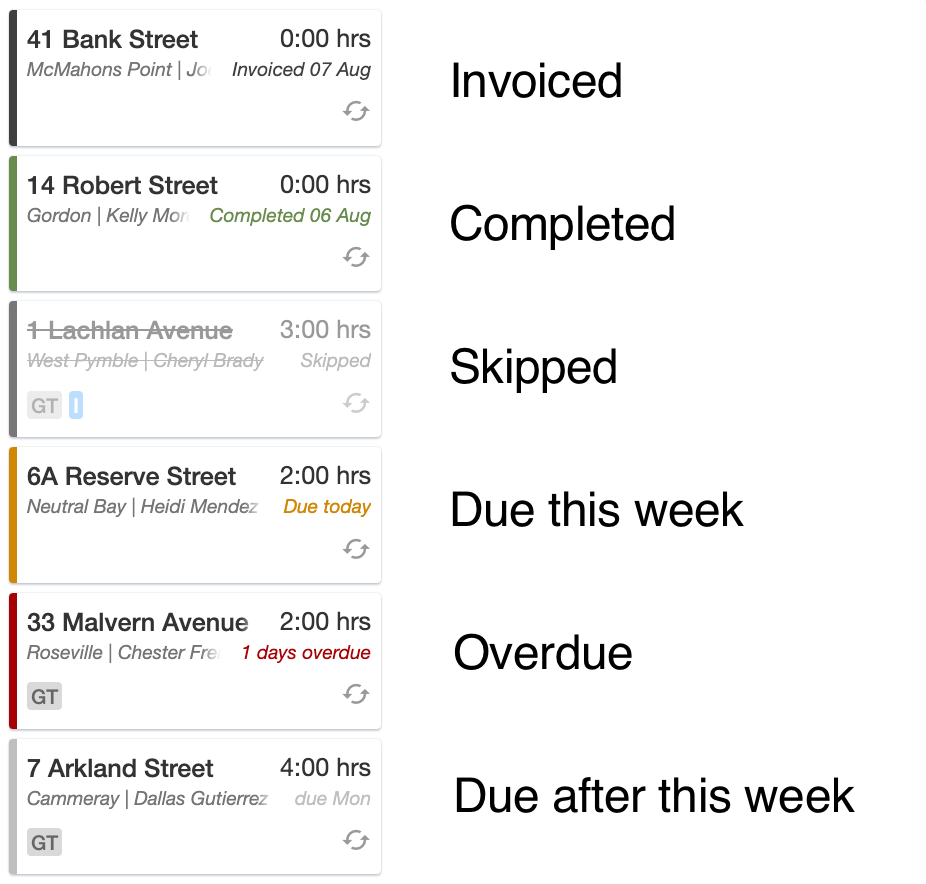
These colours show on the Day, Week, and Month schedule. Calendar day, week, and month use each job run’s crew colour instead, and blocks do not change colour when a job is completed. See Calendar view.
These job status colours are fixed based on each job’s due date and completion state. You cannot pick custom colours for individual jobs. To label job types (for example lawns vs gardening), use job tags instead.
Crew colours
Section titled “Crew colours”Crew colours are separate from the job status colours above. Each crew can have its own colour so you can tell job runs apart. To show those colours on job run titles, turn on Crew colors in the Schedule display settings.