

Resetting employee passwords
Last updated:
Sometimes an employee forgets their password or you forget to send them the welcome email when creating their employee account. When this happens you can reset their password from the Employees screen. Note that you must be an administrator in order to perform these steps.
-
Log in as an administrator, then open Settings → Company → Employees.
-
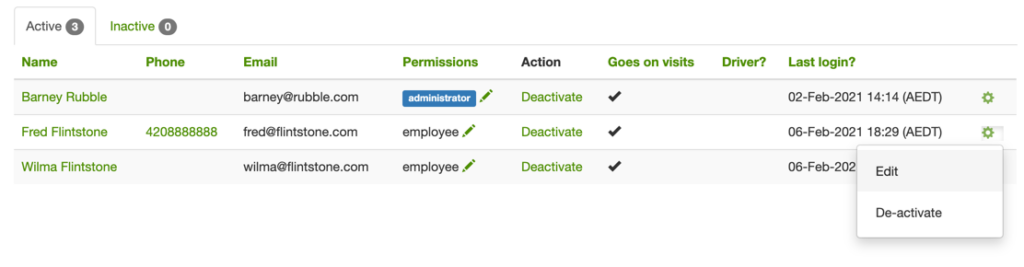
On the “cog” dropdown for the employee, click on the “edit” link.
-
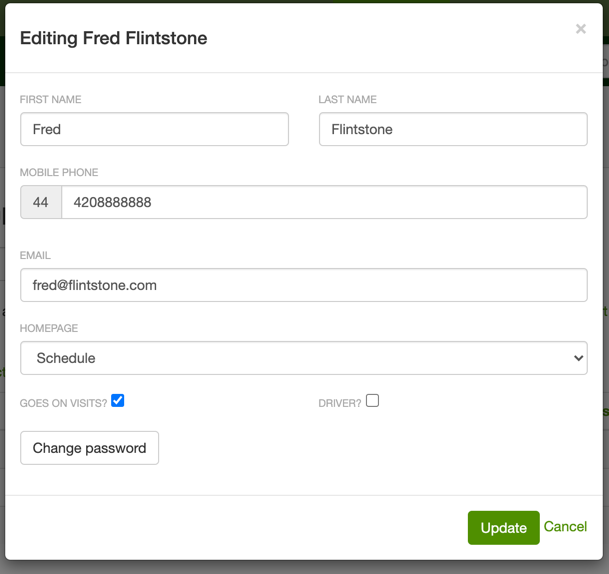
Click on the “change password” button on the “edit employee” form:
-
Enter the new password in the “edit password” form. If an employee forgets their password, they can also reset it themselves by clicking on the forgot your password link and entering the email address they use for logging into SortScape. They will then be sent the “reset password” instructions at that email address.
If the employee doesn’t receive the “reset password” email within a minute of requesting it then they should check their spam folder. Requesting the password reset multiple times can cause confusion because, each time you request a new “reset password” email, it it invalidates the links in the previous “reset password” emails sent to you. Therefore if you have received multiple “reset password” emails from SortScape you should only click on the link within the last email received. If you receive an “invalid token” error when trying to reset your password it is likely because you have clicked on an older “reset password” email.
Change your own password
Section titled “Change your own password”If you’re signed in to SortScape and want a new password, you don’t need a reset email. Administrators and employees can change their own password from their profile (contractors need an administrator to change it for them, as described above):
- Click your photo or initials at the top right, then click View profile. In the mobile app, open Roster (under More if it isn’t on the bottom bar) and tap your name.
- Click Edit (on a phone, tap ⋯ first), then click Change password.
- Enter your new password twice and click Change password.