

Time and materials administration
Last updated:
Admin access required
You must be logged in as an administrator to enable/disable time and materials tracking and manage materials types.
SortScape can also help you track employee time spent and materials used on a job so that you know how much to invoice customers.
The materials catalog is for items your team can add to jobs to record what was used. It is not a business expense tracker. See What time and materials is for.
Time and materials tracking is enabled by default. To enable or disable time and materials tracking, open Settings → Time & materials → Settings.
On this screen you can:
- Enable or disable time and materials tracking for your SortScape site
- Manage the catalog of materials that your employees can enter when listing materials used jobs.
- Edit other settings like whether to allow non-administrators to see material prices.
Editing items (name, price, and sales description)
Section titled “Editing items (name, price, and sales description)”To change the products your team picks as line items, open Settings → Time & materials → Items catalogue. You must be an administrator.
Each item has:
- Name: the product you pick when adding a line item (for example, Weed killer).
- Category: optional grouping in the catalogue. Use Select category to pick an existing category, or Create new category.
- Sale price: the default price filled in when you pick that item.
- Cost and Markup: optional. Cost is what the item costs you, and SortScape works out the sale price from cost plus markup. Only administrators see cost. It is shown on the job for reference, but reports and schedule totals use the sale price, not cost.
- Sales description: the default description filled in when you pick that item. If Sales description is blank, SortScape uses the name, so leaving it blank does not leave the description box empty. If the sales description is the same as the name (QuickBooks often stores it that way), the invoice shows the name twice: once as the item, and again as the description. Put a real description that is different from the name.
You can change an item’s category later. Open the item, choose a different category, and save. You do not need to create a new item.
When you add that item on a job, quote, or invoice, SortScape copies the current sales description and price. You can still change the description on that one line if you need to.
Changing Sales description does not rewrite text you already typed on an existing quote or invoice. For materials already on a job, the sales description is read when you create the invoice, so new invoices will use the updated text.
If the item is linked to Xero or QuickBooks Online, name, price, and Sales description are locked in SortScape. Edit the product in Xero or QuickBooks instead. SortScape picks up the change on the next sync (about every 30 minutes, or click Sync with QuickBooks now / Sync with Xero now). See Integrating with QuickBooks Online or Integrating with Xero. Category stays editable in SortScape.
Managing material categories
Section titled “Managing material categories”Categories live on the same page as the items. Open Settings → Time & materials → Items catalogue, then scroll to the Material categories table under the items list (some sites label this Item categories). You must be an administrator.
Rename a category
- Click the category in the categories table.
- Click Edit.
- Change the name and save.
Delete a category
- Click the category, then Delete, or open the ⋯ menu on that row and choose Delete.
- Confirm. Items in that category stay in the catalogue. They just no longer have a category.
The Create new category link on an item is only for adding a category. It does not rename or delete existing ones. Use the categories table for that.
What changes when tracking is disabled
Section titled “What changes when tracking is disabled”When time and materials tracking is off:
- The Invoice items section is hidden on the job show page (view mode).
- You cannot add one-off line items from the job while viewing it.
- Time spent and the job timer are hidden on the job page.
- Invoice items may still appear when you Edit a job.
If you rely on adding one-off charges from the schedule without editing the repeating series, keep time and materials tracking enabled. See One-off charges on a single job.
SortScape shows a confirmation when you disable tracking so you know these features will be removed from the job page.
Permissions and privacy on material prices
Section titled “Permissions and privacy on material prices”Material prices may be information that you do not want to share with employees. Therefore, Allow non-administrators to see material prices is disabled by default. Open Settings → Time & materials → Settings, then enable this setting to make all material prices visible to users with the employee and contractor roles.
If your account has Settings → Company → Permissions, this setting has moved there as See prices on jobs, and you can set it separately for employees, contractors and single people. See Customising employee and contractor permissions.

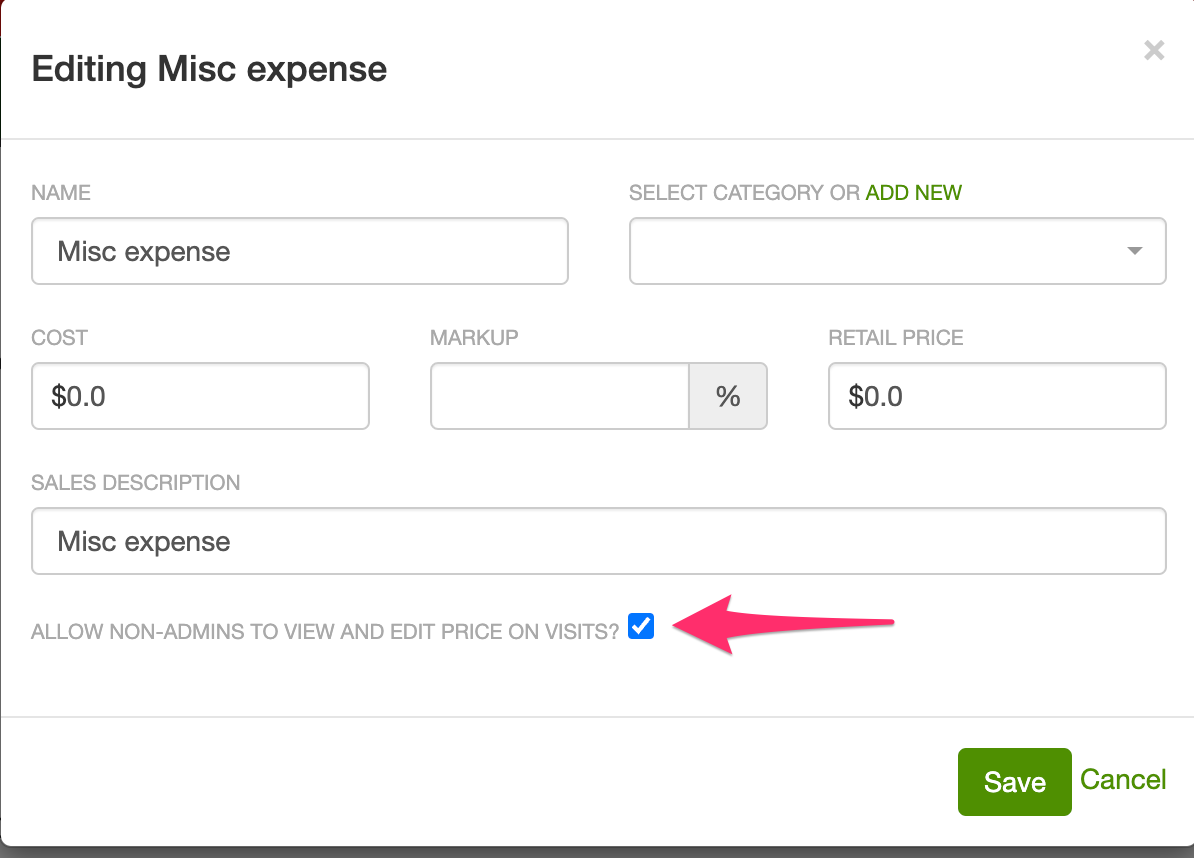
There may be variable job costs, like parking fees or miscellaneous charges on a job, that employees incur while working. In those cases you may want non-administrators to be able to enter the price on particular items. Open Settings → Time & materials → Items catalogue, then enable Allow non-admins to view and edit price on jobs? on the relevant items.
Documentation for end users
Section titled “Documentation for end users”See the end user documentation for how to enter time and materials for customer jobs.