

Deactivating employees
Last updated:
Admin access required
You must be logged in as an administrator to deactivate an employee.
You can de-activate employees who no longer work for you.
De-activating an employee keeps their work history and contact information in the system but makes them unable to log into the system and removes them from future job runs.
A deactivated employee keeps their email address, so it can’t be used for a new login until it’s changed. See if the email address is already in use.
It’s a nice alternative to deleting them entirely. This is particularly handy for managing seasonal employees. You can later re-activate them if need be.
To deactivate an employee:
-
Log in as an administrator, then open Settings → Company → Employees.
-
Click the deactivate link on the employee you wish to deactivate.
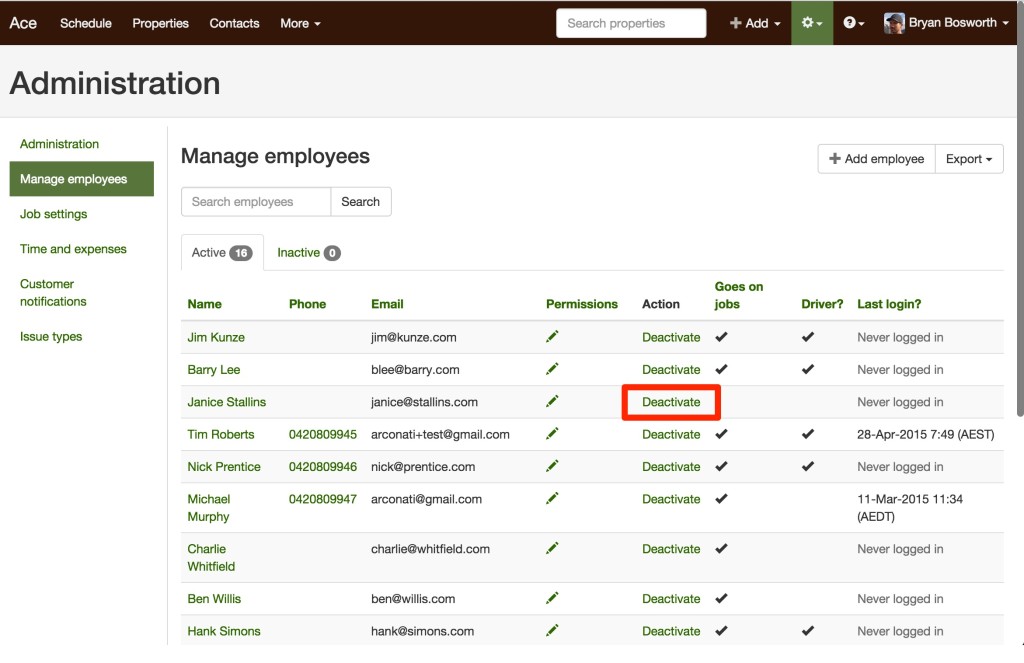
To reactivate an employee go to the “inactive” tab and click on the “activate” link next to the user you wish to activate.